Skill File Overview
What is already in this workspace?
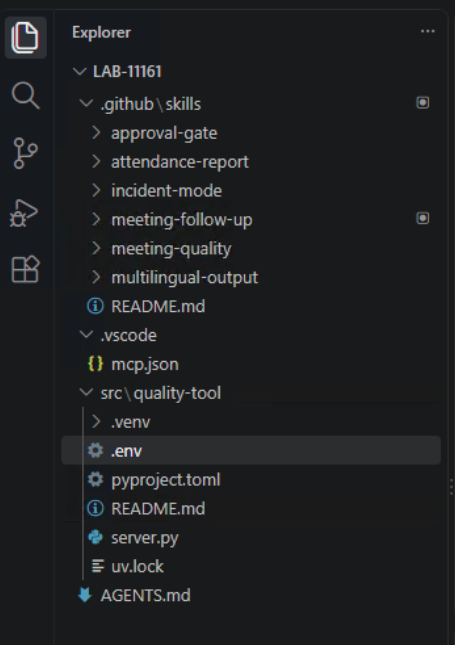
The prepared LAB-11161 workspace includes six agent skills under .github/skills/. A skill is a reusable set of workflow instructions. It helps the agent choose steps and output formats, while Control Hub policy determines which Webex tools are available and you approve side effects.
| Skill | When it helps |
|---|---|
meeting-follow-up |
Turn a completed meeting transcript into a reviewed recap with evidence-backed actions |
meeting-quality |
Analyze per-participant quality telemetry and separate observations from hypotheses |
approval-gate |
Preview a Webex write action and request explicit approval |
incident-mode |
Coordinate a restricted quality incident space and updates |
attendance-report |
Report attendance without claiming unsupported engagement |
multilingual-output |
Translate a reviewed output while preserving names, dates, and evidence |
Lab 3 covers the manual follow-up workflow and customization of meeting-follow-up. Lab 4 uses the quality server and explores meeting-quality and incident-mode. Lab 5 brings those skills together in one business request.
How skills are arranged
AGENTS.md at the workspace root provides general lab instructions. Each skill directory contains a SKILL.md with a name and description. Some skills link to a references/ directory for the detailed workflow or output format.
LAB-11161/
├── AGENTS.md
├── .github/
│   └── skills/
│       ├── approval-gate/
│       ├── attendance-report/
│       ├── incident-mode/
│       ├── meeting-follow-up/
│       ├── meeting-quality/
│       └── multilingual-output/
├── .vscode/mcp.json
└── src/quality-tool/
Open Configure Skills in Copilot Chat, or type / in the chat input, to see the discovered skills. The agent may load a skill when your request matches its description. Ask it which skill it used and inspect the tool calls; a good final answer alone does not prove the intended skill or data source was used.
What can you customize?
You can change section names, action-item labels, space naming, report formatting, terminology, and troubleshooting checks. Keep transcript evidence, missing-data handling, private-data limits, and approval before Webex writes.
Skills guide behavior
A skill file is not an enforcement boundary. Control Hub can disable Webex tools, and VS Code asks you to review tool calls. If a skill or response proposes an unreviewed write, stop and correct it.